PharmacyPilot Widget User Guide
📋 Overview
This guide provides comprehensive information about PharmacyPilot's widget system, including available widget types, token management, and implementation details.
🎯 Widget Types and Details
🆓 Free Widgets
1. 📝 Review Collector (reviewCollector)

Features:
- Basic review collection form
- Direct link to review page
- Simple and intuitive interface
- Mobile-responsive design
Implementation:
<script src="https://pharmacypilot.info/api/get-reviews/YOUR_WIDGET_TOKEN?widget_type=reviewCollector"></script>
<div id="pharmacy-pilot-widget"></div>
💎 Premium Widgets
| Widget Type | Image | Features |
|---|---|---|
Micro Review Count (microReviewCount) |  | • Show number of reviews • Compact design • Direct link to review page • Real-time count updates • Minimal space requirement |
Micro Combo (microCombo) |  | • Show confidence score • Display review count • Link to all reviews • Combined metrics display • Interactive elements |
Micro Button (microButton) |  | • Display review count • Direct link to review page • Flexible button placement • Customizable styling • Mobile-responsive design |
Micro Star (microStar) |  | • Show star rating • Compact size • Direct link to review page • Visual star representation • Real-time rating updates |
Review Mini (reviewMini) |  | • Average review score • Display review count • Direct link to review page • Compact design • Essential review information |
Micro Rate Score (microRateScore) |  | • Average review score • Easy-to-read numerical format • Direct link to review page • Clean numerical display • Real-time score updates |
Review Starter (reviewStarter) | 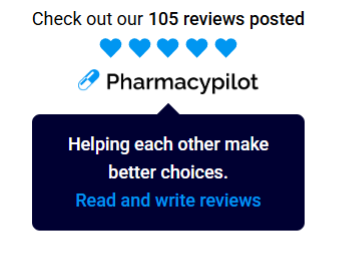 | • Display review count • Show average star rating • Call-to-action button for reviews • Direct link to review page • Interactive elements |
Review Carousel (reviewCarousel) | 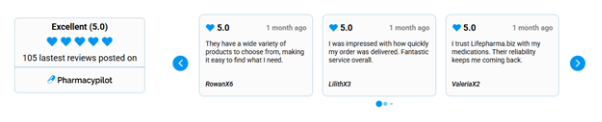 | • Display review count • Show numerical average score • Display star rating • Show multiple rotating reviews • Direct link to review page • Auto-rotation capability |
Review Products (reviewProducts) |  | • Show numerical average score • Display star rating • Show review count • Product-specific metrics • Detailed review information |
🔑 Widget Token Management
📝 Token Creation Requirements
👤 Account Requirements
- Must have an active PharmacyPilot account
- Verified email
- Complete business profile
🏢 Business Requirements
- Verified business information
- Claimed business profile
- Correct business name
- Active business status
💳 Subscription Requirements
- Free widgets: Basic account
- Premium widgets: Premium subscription required
- Valid payment method
📥 How to Get Widget Token
- Log in to Pharmacy Pilot with a business-claimed account

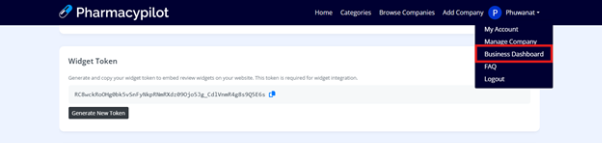
- Go to Account Settings menu
-
Select Business Dashboard menu
-
On the Business Dashboard page
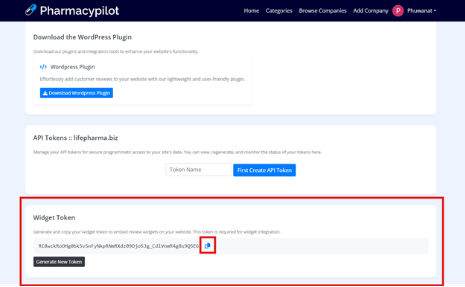
- Scroll to "Widget Token" section
- Copy Widget Token
🔄 How to Generate Token
- Log in to Pharmacy Pilot with a business-claimed account
- Go to menu, select Business Dashboard
- Scroll to Widget Token section
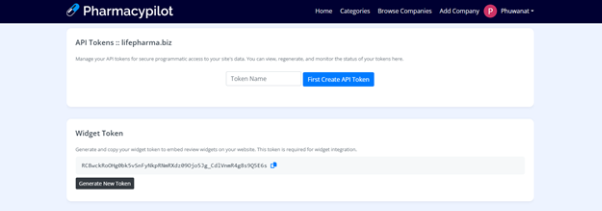
- If you don't have a token, click Generate Token button

- Copy the Token

⚙️ Token Requirements
🔒 Security
- Token is specific to each business
- Non-transferable
- Can generate new token
- Premium features limited to premium account holders
💻 Usage
- One business can have only one active token
- Must be used as specified
- Account must be active
- Must have appropriate subscription
- One token can be used with multiple widgets
- Same token can be used for both free and premium widgets (if you have premium access)
🛠️ Troubleshooting
- If widget doesn't display, verify token is copied correctly
- Check that your account status is active and verified
- Verify you have appropriate access rights
- If issues persist, please contact support
💻 Installation Guide
🛠️ Basic Installation
Add the following code to your website:
<!-- Place in <head> or before </body> -->
<script src="https://pharmacypilot.info/api/get-reviews/YOUR_WIDGET_TOKEN?widget_type=reviewCollector&limit=&rate=5"></script>

<!-- Container for widget display -->
<div id="pharmacy-pilot-widget"></div>
📋 Widget Parameters
| Parameter | Description |
|---|---|
YOUR_WIDGET_TOKEN | Your unique widget token from Business Dashboard |
widget_type | Specifies which widget to display |
limit | Optional: Number of reviews to display |
rate | Optional: Minimum rating filter |
📝 Example Implementation
<script src="https://pharmacypilot.info/api/get-reviews/abc123xyz?widget_type=reviewCollector&limit=10&rate=4"></script>
This example will:
- Use token "abc123xyz"
- Display the Review Collector widget
- Show up to 10 reviews
- Only display reviews with 4 stars or higher
✅ Best Practices
- Always use the most recent token
- Design widgets to be responsive across all devices
- Test widgets across multiple browsers and devices
- Monitor widget performance and user engagement